
ThingsBook
ThingsBook StudioSocial
4.3518.00 Reviews
- Version
- 1.1.9
- Installs
- 100.00K
- Age Rating
- Teen
Screenshots


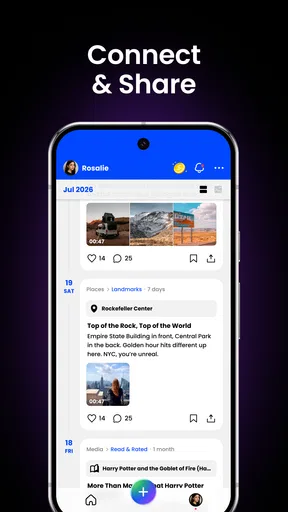
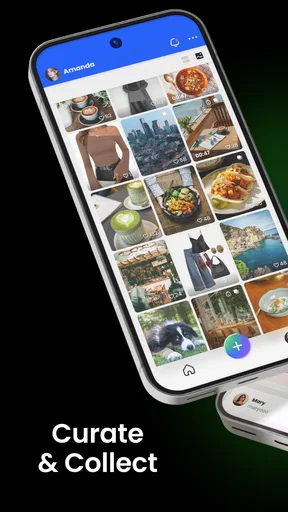
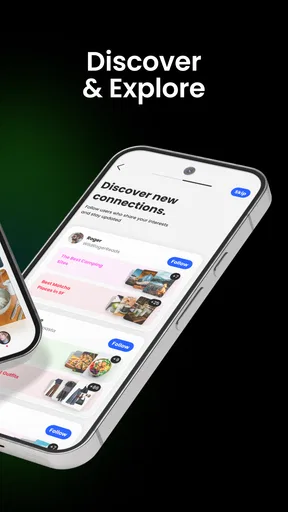
Our Review of ThingsBook
 Analysis by Appyee
I usually approach new social apps with a little caution. Many promise a more personal online space, then turn out to be another feed to maintain, another notification stream to ignore, or another place where private thoughts feel strangely public. ThingsBook takes a quieter route. It is a free social app from ThingsBook Studio built around writing, collecting, and archiving pieces of your life, and that focus makes it feel closer to a personal scrapbook than a conventional network.
After spending time with it, my impression is that its appeal depends less on chasing interaction and more on whether you enjoy keeping meaningful fragments in one place. I can imagine using it for short reflections, memories, lists, small discoveries, or entries I want to revisit later. It is not trying to replace every social platform, and that is one of its strengths. At the same time, its narrow purpose means it will not satisfy someone looking for a busy community, instant messaging, or a polished public publishing platform.
How ThingsBook feels in its current form
The current release is version 1.1.1, and the app was released on January 19, 2026. That places it in an early stage where the basic idea is already clear, but the long-term shape of the product is still something users will be watching. ThingsBook Studio has chosen a focused starting point: give people a personal space for written material and collected memories instead of filling the screen with unrelated social activity.
That distinction matters in everyday use. When I open a typical social network, I am usually reacting to other people’s updates. In ThingsBook, the starting point is my own material. I decide what deserves to be written down, kept together, or revisited. The experience therefore feels slower and more deliberate. If you want a place that encourages you to pause and record something, this approach is appealing. If you need instant responses from friends, it can feel unusually quiet.
The app belongs to the social category, but I would describe its social character carefully. It is not social in the same way as a chat app or a public video platform. Its value comes from the relationship between a person and their own archive, with sharing and discovery taking a less dominant role in the experience I reviewed. That makes it especially interesting for people who want online tools to support reflection rather than constant performance.
Its audience is already large enough to suggest that the concept has found interest: ThingsBook has passed 100K installs, with an average rating of 4.2 from 739 ratings and 260 written reviews. Those figures are useful context, but they do not tell me whether it will fit your habits. A personal archive succeeds only when its owner returns to it, and that depends on how naturally the writing and organizing flow fits into daily life.
A practical way to use it every day
Imagine finishing a weekend trip. Instead of scattering photos, restaurant names, small observations, and a sentence about your mood across several apps, I would use ThingsBook as a compact travel record. I might write a short entry while waiting for a train, collect a few details I want to remember, and return later to add context once I am home. The important benefit is not simply having another note. It is having a dedicated place where the memory is treated as something worth preserving.
The same workflow works for less dramatic moments. I could keep a running record of books I want to read, meals that turned out well, ideas for a future project, or small wins from a difficult week. The app’s personal framing makes these fragments feel less disposable than messages typed into a chat with myself. For this kind of use, I recommend writing short entries first and resisting the temptation to create a perfect archive immediately. Consistency matters more than elaborate organization.
One useful habit is to separate capture from editing. When an idea appears, I would put it into the app in its simplest form rather than spending time polishing it. Later, I could return to the entry and add a clearer title, a useful detail, or a connection to another memory. This two-step approach reduces the friction that often causes journaling systems to fail. It also suits an app whose central promise is keeping personal material available over time.
What the early release gets right
The strongest part of the experience is its sense of purpose. ThingsBook does not need to compete with a crowded timeline because it is built around a different question: what do I want to keep? That makes it easier for me to imagine a repeatable routine. I can open it with a specific intention instead of being pulled into whatever happens to be trending.
I also like the emotional difference between archiving and posting. Posting often encourages me to think about an audience before I have finished thinking about the moment itself. An archive encourages the opposite order. I can write for my future self, which changes the tone of the material. A plain sentence such as “I finally understood why this project was stuck” may be more valuable later than a carefully worded public update.
Another non-obvious advantage is that the app can act as a bridge between a diary and a collection manager. A diary usually follows time, while a collection follows a subject. ThingsBook’s concept supports both ways of thinking: I can record what happened today, but I can also build a group of related memories around a hobby, a personal goal, or a recurring experience. That flexibility is more useful than a rigid daily-journal format for people whose lives do not produce one polished entry every evening.
There is also a practical benefit for people who dislike the pressure of visible engagement. I do not need to measure a successful entry by likes, replies, or reach. A note can be worthwhile simply because it helps me remember something accurately. That makes the app a better match for private-minded users than public social networks, even though it still sits in the social category.
How it compares with familiar alternatives
Compared with a standard notes app, ThingsBook feels more intentional for personal records. Notes apps are excellent when I need a quick checklist, a temporary reminder, or a place to paste information. They can become messy when long-term memories, reflections, and collections are mixed with work notes and shopping lists. ThingsBook’s dedicated identity gives personal writing a clearer home.
Compared with a traditional journaling app, it appears less narrowly tied to a daily diary routine. A conventional journal often asks me to think in terms of dates and regular entries. ThingsBook is more attractive when I want to collect different kinds of life material without forcing every thought into a daily sequence. That is a meaningful trade-off: people who love structured prompts and strict streaks may prefer a purpose-built journal instead.
Compared with a social feed, the app is calmer and more self-directed. I am less likely to open it for entertainment or breaking news, but that is precisely why it may be easier to protect from distraction. Compared with cloud document tools, it is more personal in tone, though those tools remain better for collaborative editing, complex formatting, and professional files. I would not use ThingsBook as a replacement for a shared project workspace.
The choice becomes simple when I focus on the job. Use ThingsBook when the goal is to preserve personal material in a dedicated space. Choose a messaging app when immediate conversation matters. Choose a notes or document app when speed, collaboration, or technical organization matters more than the feeling of keeping a life archive.
Changes, version context, and what existing users should expect
Because version 1.1.1 is still an early release, I see the product as an evolving foundation rather than a finished ecosystem. The release date and current version establish where the app stands today, but they do not justify promises about future additions. My advice to existing users is to judge the current workflow on its own merits: can you capture something quickly, find it again, and feel comfortable returning to it?
For someone upgrading from an earlier build, the most important question is not whether the version number sounds substantial. It is whether the everyday path from opening the app to preserving a thought feels dependable and clear. I would test that with a small personal collection first rather than moving an entire archive immediately. Create several different kinds of entries, revisit them after a few days, and see whether the organization still makes sense when the initial excitement has faded.
This is also the right stage to form careful expectations. Early users often influence the direction of a focused app through the habits they develop and the weaknesses they notice. If you value the concept, use it consistently enough to discover where it helps and where it slows you down. That produces a more useful judgment than treating the app as a novelty after one brief session.
People considering installation may also wonder about cost and device compatibility. ThingsBook is free, carries a Teen content rating, and requires Android 10 or later. That makes the barrier to trying it fairly low for compatible Android users, although the age classification is a reminder that the app should not automatically be treated as a children’s product. I would still approach any personal archive thoughtfully and avoid writing highly sensitive information unless I am comfortable with the way I manage that material.
Where the experience still has friction
The focused design can become a limitation if you expect a full social platform. I would not install ThingsBook hoping to find a large stream of lively public discussion, fast reactions, or a built-in audience for every entry. Its quieter character is valuable for reflection, but it may feel empty to someone whose main reason for using a social app is conversation.
There is also a commitment problem. A personal archive has little value if I forget to add anything, and no app can completely solve that behavioral issue. ThingsBook makes the idea attractive, but I still need a routine. A good starting point is to attach it to an existing moment, such as the end of a commute or the last few minutes before bed. Without that trigger, the app can become another promising tool that receives attention only during the first week.
Organization is another area where I would be cautious. The more material I collect, the more important retrieval becomes. I would avoid creating dozens of overly specific categories at the beginning because that can make filing feel like administrative work. A small number of broad themes, combined with clear wording inside entries, is usually easier to maintain. If your archive grows into a complex research system, a dedicated knowledge-management app may offer deeper controls.
Privacy-minded users should also make a deliberate decision about what belongs in a social product. The personal tone may encourage intimate writing, but I would not confuse a beautiful private space with a guarantee that every thought is suitable for digital storage. I would keep highly sensitive credentials, financial details, and information about other people out of any casual archive. That is sensible practice regardless of the app, but it matters more when an app invites personal disclosure.
Small workflows that make it more useful
My first recommendation is to use it for “unfinished” material. Instead of waiting until a memory becomes a polished story, record the rough version while it is still fresh. A few words about why a conversation mattered, what made a meal memorable, or where an idea came from can become valuable later. This turns the app into a memory-capture tool rather than a test of writing discipline.
Second, I would create collections based on future retrieval rather than present emotion. “Things I want to remember” may sound natural, but a more specific theme such as “ideas for the next trip” or “lessons from difficult projects” will help me recognize the purpose months later. This is a subtle trade-off: categories that are too broad become vague, while categories that are too narrow create filing friction.
Third, I would schedule a short review session instead of trying to reread everything. Once a week, I could open a few older entries, add one missing detail, and decide whether they still belong where I placed them. That review gives the archive a living quality and helps reveal which kinds of entries are genuinely useful. It also lets me notice whether I am collecting too much without ever returning to it.
A fourth workflow is to use the app as a decision record. When I choose a course, change a routine, or begin a personal project, I can write down what I expected at the start. Later, the entry becomes a way to compare expectation with reality. This is more useful than a generic diary for people who want to learn from their own patterns, and it gives the archive a practical purpose beyond nostalgia.
Who should try it, and who should skip it
I would recommend ThingsBook to someone who wants a personal social space with less noise, enjoys collecting small details, and is willing to build a modest writing habit. It is particularly suitable for travelers, reflective users, hobbyists, and people who keep scattered notes about experiences they want to revisit. It may also appeal to anyone who finds public posting too performative but still wants a dedicated digital place for life records.
I would skip it if your priority is real-time communication, professional collaboration, advanced document management, or a large entertainment feed. I would also hesitate if you already have a well-maintained journaling system and do not want to divide your archive between two apps. Switching tools only makes sense when ThingsBook’s personal-collection approach solves a problem your current setup leaves open.
The Teen rating is worth considering for families and younger users. I would treat it as a social product that deserves normal online-safety conversations, especially when personal stories involve other people or identifying details. Adults can use it as a reflective archive, but the same care about boundaries applies to every age group.
What I will watch as the product develops
The next stage of ThingsBook should be judged by how well it handles growth without losing its calm identity. I would watch whether larger personal archives remain easy to browse, whether returning users can find older material without effort, and whether new additions support the writing-and-collecting idea instead of turning the app into another noisy feed.
I would also pay attention to the balance between personal control and social discovery. Too little connection could make the app feel isolated for users who want selective sharing; too much emphasis on public activity could weaken the private, reflective quality that makes it distinctive. The best direction would preserve the archive as the center of the experience rather than making personal writing secondary to engagement.
For now, my recommendation is measured but positive. ThingsBook is not a universal replacement for notes, journals, chats, or social networks. It is a focused option for people who want to keep the meaningful pieces of ordinary life in a space that feels more personal than a timeline. I like its restraint, and I think the concept has room to become genuinely useful as long as future development protects that sense of purpose.
Since it is free and available for Android 10 or later, trying it does not require a major commitment. I would begin with one collection, a handful of honest entries, and a realistic review routine. If you enjoy returning to what you have written, the app may become a quiet part of your week. If you need conversation, collaboration, or constant activity, another category of app will serve you better. Its real strength is not making life look busier; it is giving personal memories somewhere deliberate to stay.
Privacy and Permissions
See what permissions an app requests and how it handles your data.
- Contacts
- read your contacts
- Location
- approximate location (network-based), precise location (GPS and network-based)
- Photos/Media/Files
- read the contents of your USB storage, modify or delete the contents of your USB storage
- Storage
- read the contents of your USB storage, modify or delete the contents of your USB storage
- Camera
- take pictures and videos
- Wi-Fi connection information
- view Wi-Fi connections
- Other
- view network connections, change network connectivity, full network access, run at startup, draw over other apps, control vibration, prevent device from sleeping, Google Play license check
Verdict
Strengths of ThingsBook
- Simple interface makes adding and reviewing tasks quick.
- Flexible categories help organize personal, work, and shared items.
- Reminders can help prevent important tasks from being forgotten.
- Useful for users who prefer a lightweight productivity tool.
- Clear task lists make daily priorities easy to scan.
Limitations of ThingsBook
- Advanced planning features may be limited for complex projects.
- Some useful options may require in-app purchases or upgrades.
- The app may feel basic for users needing detailed collaboration tools.
- Notification behavior can depend on device and system settings.
- Data backup and synchronization options may not suit every workflow.
Similar Picks in This Category
View All
Meta Platforms, Inc.4.6

Instagram4.0

Likee-Live, Chat & Party Games
Likeme Pte. Ltd.4.4

Facebook Lite
Meta Platforms, Inc.4.5

TikTok - Videos, Shop & LIVE
TikTok Pte. Ltd.4.0

Moj: Free Short Drama & Reels
ShareChat4.1
Frequently Asked Questions
What is ThingsBook and what can I use it for?
ThingsBook is a personal organization and productivity app designed to help you keep important information, tasks, notes, lists, and everyday details in one convenient place. After exploring its features, it appears most useful for users who want a simple digital reference book rather than several separate apps. You can use it to organize personal reminders, practical information, ideas, and other content you need to access regularly.
Is ThingsBook easy to use for beginners?
Yes, ThingsBook is generally approachable for beginners, especially if you prefer straightforward organization instead of complicated project-management systems. The app’s value comes from keeping information grouped and accessible without requiring extensive setup. However, new users may need a little time to decide how they want to structure their entries and categories. Creating a consistent naming and organization system will make the app much more useful over time.
Does ThingsBook require an internet connection?
ThingsBook may allow you to view or manage much of your stored content while offline, depending on the specific feature being used and the version installed on your device. An internet connection can still be required for downloading the app, receiving updates, synchronizing information, or using connected services. Before relying on it while traveling or without mobile data, test the functions you need in offline mode.
Is my information safe when using ThingsBook?
Before adding highly sensitive information to ThingsBook, users should review the app’s privacy policy, permissions, backup options, and any synchronization settings available in the current version. As with any organization app, security depends partly on your device lock, account protection, and update habits. Avoid storing passwords, financial details, or confidential documents unless the app clearly provides suitable encryption and privacy controls.
Is ThingsBook free, and are there any in-app purchases?
ThingsBook’s availability and pricing can vary according to the platform, region, and version offered in the official app store. Some editions may be free, while additional functions, expanded storage, synchronization, or an ad-free experience could require payment. Check the download page carefully before installing, including the in-app purchase section and subscription terms, so you understand which features are included at no cost.
